
This sketch is used by Exercise: Sensor Fade.
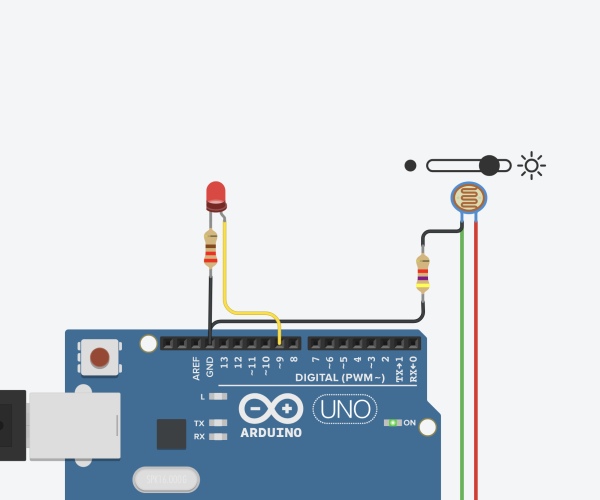
Full Source Code
The full code is all in one file SensorFade.ino.
// SensorFade - read a photosensor and control several LEDs at different brightnesses
//
// Copyright (c) 2016, Garth Zeglin.  All rights reserved. Licensed under the
// terms of the BSD 3-clause license as included in LICENSE.
//
// This program assumes that:
//
//  1. A sensor is attached to analog input A0.  The exercise uses a photocell
//     with a 5.6K pull-down resistor in a voltage divider.
//
//  2. Pins 5 and 6 are attached via dropping resistors to LEDs which connect to
//     ground.  The output pin is used to source current; the logic will be
//     positive (HIGH = ON).

// ================================================================================
// Definitions of constant values.
const int LED1PIN = 5;
const int LED2PIN = 6;
const int SENSORPIN = A0;

const int BLINKDELAY = 500;  // interval between fixed blinks, in milliseconds

// The following declarations define scaling constants and thresholds for
// interpreting the analog input signal.  The input range for a typical
// photocell with a 5.6K bias resistor is centered around 4 volts.  This can be
// verified using a voltmeter to check the range of inputs on A0 and adjust the
// following V_DARK and V_LIGHT values.  Note the use of the scaling factors to
// scale the measured voltages into ADC units.

// These are physically measured voltages defining the typical dark and light
// input voltages.  You may need to change these:
const float V_DARK  = 3.5; // in Volts
const float V_LIGHT = 4.2; // in Volts

// These are properties of the Arduino analog-to-digital converter:
const float ADC_MAX_VOLTAGE = 5.0;  // in Volts
const int   ADC_RANGE       = 1024; // in dimensionless ADC units

// These thresholds are calculated from the other constants.
const int V_LOW  = V_DARK  * (ADC_RANGE/ADC_MAX_VOLTAGE);  // in dimensionless ADC units
const int V_HIGH = V_LIGHT * (ADC_RANGE/ADC_MAX_VOLTAGE);  // in dimensionless ADC units

// ================================================================================
// Global variable declarations.

// Counter variable to keep to track of the number of update periods for
// defining the blinks of the onboard LED.
int led_cycle_count = 0;

// ================================================================================
// Configure the hardware once after booting up.  This runs once after pressing
// reset or powering up the board.

void setup(void)
{
  // Initialize the hardware digital pin 13 as an output.  The 'OUTPUT' symbol
  // is pre-defined by the Arduino system.
  pinMode(LED_BUILTIN, OUTPUT);

  // Initialize the external LEDs as outputs.
  pinMode(LED1PIN, OUTPUT);
  pinMode(LED2PIN, OUTPUT);

  // Produce a timed sequence of blinks to indicate the start of the program.
  fixed_blink_pattern();  // this function is defined below
}

// ================================================================================
// Run one iteration of the main event loop.  The Arduino system will call this
// function over and over forever.

// This function continuously maps changes of the photocell input level into
// pulse-width-modulated (PWM) output on the LED.

void loop(void)
{
  // Read the voltage on the sensor input.  This function returns a value
  // between 0 and 1023 representing a voltage between 0 and 5V.
  int sensor = analogRead(SENSORPIN);

  // Compute proportional signals to drive the LEDs by mapping an input range to
  // the output range.  The input thresholds are defined above in this file.  The
  // PWM output is scaled from 0 to 255.
  int led1_value = map(sensor, V_LOW, V_HIGH,   0, 255);
  int led2_value = map(sensor, V_LOW, V_HIGH, 255,   0);  // symmetric scaling

  // Emit PWM signals with a proportional average power; the LEDs will have
  // variable brightness.  The constrain function will ensure the values stay
  // within the correct limits.
  analogWrite(LED1PIN, constrain(led1_value, 0, 255));
  analogWrite(LED2PIN, constrain(led2_value, 0, 255));

  // Blink the onboard LED.  led_cycle_count is a global variable defined above.
  if (led_cycle_count == 0) {
    digitalWrite(LED_BUILTIN, LOW);
  } else if (led_cycle_count == 32) {
    digitalWrite(LED_BUILTIN, HIGH);
  }
  // Increase the cycle count for the next iteration.
  if (led_cycle_count < 63) {
    led_cycle_count += 1;
  } else {
    led_cycle_count = 0;
  }

  // Delay for a short interval to create a periodic sampling rate.
  delay(20);
}
Read more: Arduino Sketch SensorFade